How to Sell Digital Downloads on Etsy: A Starter Guide

Digital downloads let you make a useful product without packing a box or arranging shipping. They do not remove the work of choosing an audience, preparing dependable files, and setting clear expectations. If you’re starting an Etsy shop, we recommend moving from one specific buyer problem to one well-tested listing, then improving it as you learn. For more guidance, see How to sell digital downloads on Etsy in 2026.
Start with a specific buyer and a useful download
Begin with the person you want to help and the task they need to finish. “A wedding planner” is broad; a printable planning workbook for couples organizing a small ceremony has a clearer purpose. That focus helps you decide which pages belong in the download and which do not.
Browse comparable Etsy listings to understand the formats buyers encounter and the questions they ask. Use that research to spot an unmet need, not to copy another seller’s design or wording. Your product should have its own structure and a distinct reason to exist.
Choose a format that suits the task. A PDF works well for a fixed printable; an editable template may help buyers personalize text; a spreadsheet can handle calculations or sortable information. Before listing, open every file, follow any included instructions, and test the experience a buyer will have. If a printable has several paper sizes, test each one rather than assuming it scales neatly.
Build a listing that answers questions before purchase
Your title should name the download and its intended use in ordinary language. Then use the description to remove uncertainty: say what files are included, whether they are editable, what software is required, and what the buyer can do with them. State clearly that the purchase is digital and that no physical item will arrive.
Preview images can show the finished pages or template and call out important details, such as page count or format. They should help someone recognize what they are buying—not imply that a printed binder, frame, or other physical prop is included. Our team uses this quick check to catch gaps before publication:
| Check | Question to answer in the listing |
|---|---|
| Contents | Exactly which files or pages are included? |
| Compatibility | What app, device, or paper size does the buyer need? |
| Delivery | How will the buyer access the digital purchase? |
| Use | What can the buyer do with the file, and what restrictions apply? |
For the platform-specific steps, consult Etsy’s guide to selling digital downloads. Describe access in a way that matches Etsy’s current process and the type of digital listing you create.
Price for the value and the work behind it
A digital file has no packing cost, but it still takes time to create, test, explain, and maintain. When choosing a price, consider the job the download helps a buyer complete, the quality and scope of the finished product, comparable options, and the support you may need to provide. Account for platform charges using Etsy’s current fees and payments policy rather than an old estimate.
If you sell a basic version and an expanded version, make the difference concrete. For example, identify the pages or functions added to the expanded option. A buyer should not have to infer whether two similar-looking products serve different needs. Clear distinctions also make it easier for you to answer questions consistently.
Launch, learn, and improve
Before you publish, review Etsy’s current digital-item requirements and intellectual property policy. Upload only work you have the right to sell. That includes checking the licenses for any third-party graphics, fonts, or other assets you use; permission to use an asset in your own design does not necessarily permit redistribution in a template.
Once your listing is live, keep a simple record of buyer questions. If people repeatedly ask whether a file is editable or what paper size to use, improve the description or preview images. When you want to evaluate a change, make one meaningful adjustment at a time—perhaps a clearer first image or a more specific title—rather than rewriting everything at once. That gives you a better chance of understanding what changed, without treating any one adjustment as a guaranteed sales fix.
Want a structured path from idea to sale?
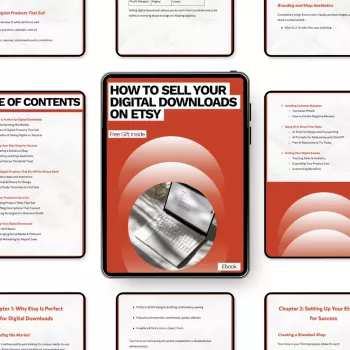
If you prefer a dedicated resource as you work through these decisions, our How to Sell Your Digital Downloads on Etsy eBook guide is an option. Use the steps above as a working checklist, then decide whether additional guidance suits your experience and the download you plan to make.
It can also help to keep the shop’s administrative side separate from product creation. For small-business recordkeeping, our Corporate Credit Card Mastery Checklist is a separate digital resource for managing corporate card use; it is not an Etsy listing guide. Choose tools for the task at hand, and leave room to refine your product after launch. No guide or checklist can guarantee sales.
FAQ
Do I need to ship anything when I sell a digital download on Etsy?
No physical shipment is involved for a digital listing. Tell buyers the file format and how they can access their purchase under Etsy’s current digital-listing process.
Can I sell a template made with third-party graphics or fonts?
Only if the licenses permit your intended resale or distribution. Review each asset’s license and Etsy’s intellectual property rules before listing.
What should I improve first if a listing is not selling?
Start by checking whether the product serves a specific buyer and whether the first image, title, and description clearly explain its use and contents. Make one meaningful change at a time; no single edit guarantees sales.








Leave a comment